The Pebble Interface
Pebble puts the whole application in one sidebar. There’s no top bar and no second panel beside your chat — the rail on the left carries your workspace, the navigation, your conversations, and you, which leaves the rest of the screen for the work itself.
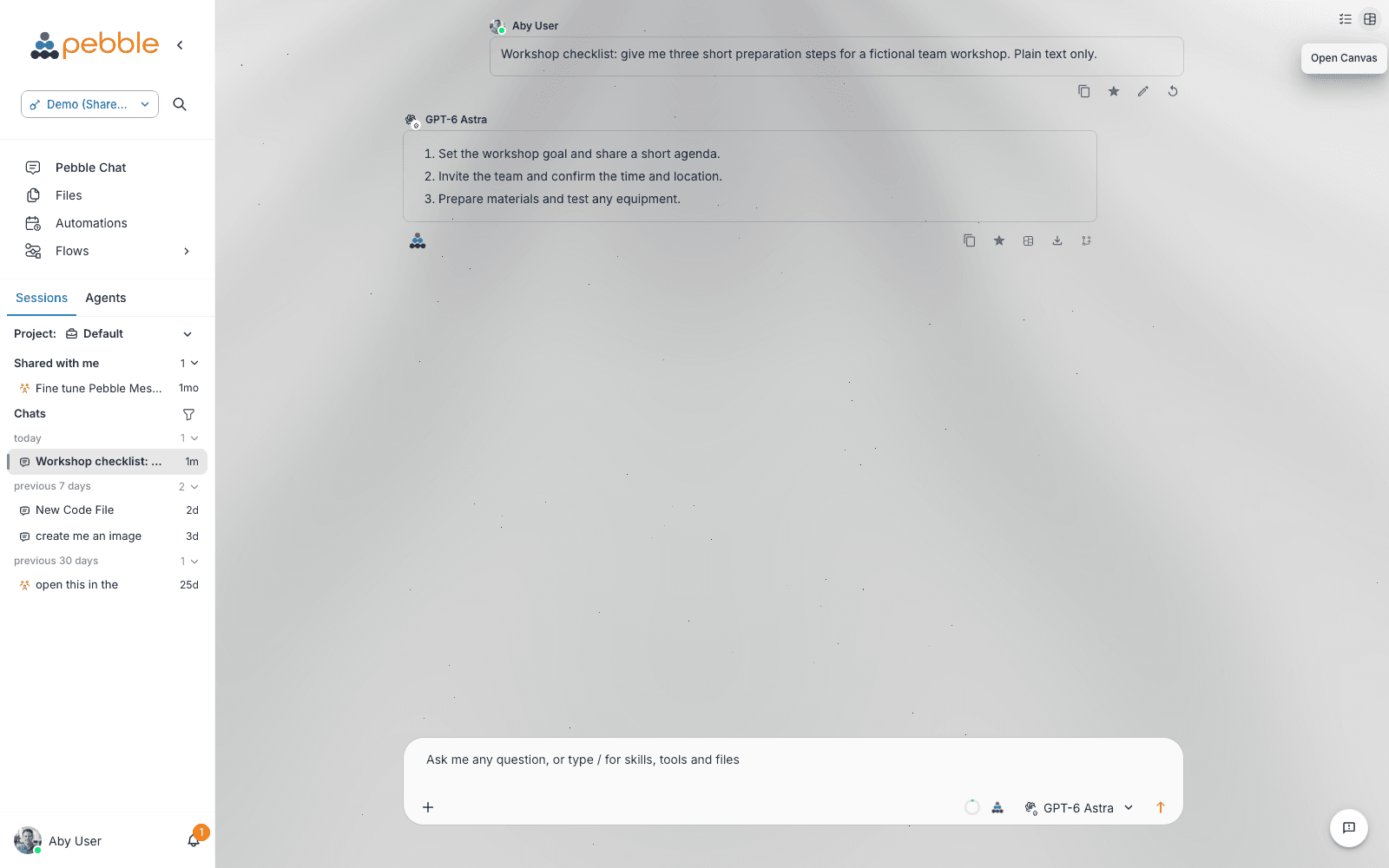
The sidebar, top to bottom
| Section | What’s there |
|---|---|
| Workspace | The workspace switcher, and a magnifier that searches the whole workspace — chats, files and flows in one go |
| Navigation | Pebble Chat, Files, Automations, Flows — hover any item for a plain-language description. Flows carries a small submenu with Templates |
| Chat history | The current project’s conversations — search, filters, pins, and chats shared with you (full tour) |
| You (bottom-left) | Your avatar and name, with the notifications bell beside it — profile, settings, appearance, help, and sign out |
Make it yours. The collapse toggle beside the logo shrinks the rail to icons; drag its right edge to the width you like. Pebble remembers both. Collapsed, the sections become icons — search, workspace, chat history as a popover — and the Pebble Chat icon turns into a one-click New Chat button when you hover it.
The profile menu
Click your name at the bottom-left:
- Organisation — switch organisation, if you belong to more than one
- Profile — your name, photo, password and sign-in details
- Settings — your capabilities, credentials, models and memory (User Settings)
- Help — the Welcome Guide, Tour the new experience, What’s New, Documentation, and Submit Feedback
- Appearance — Light / System / Dark
- Logout
Settings has its own sidebar
Open Settings and the rail is replaced by a settings sidebar — a Back to Pebble button, a search box, your Personal pages (Profile, Usage, Logs, Executions, Document Stores, Capabilities, Credentials, Subscriptions, Variables, API Keys, Memory, Models, Version & About), and — for admins — an Admin section with the Platform, Partner and Organisation consoles. Your profile stays pinned at the bottom, so you’re never more than a click from anywhere.
New here?
A short guided tour points out where everything lives — the single sidebar, workspace search, your chats, your profile, and the calmer composer. You can replay it any time from Help → Tour the new experience. A companion “Where things have moved” summary covers the same ground in writing.
In this section
- Workspaces — What a workspace is, how members and assets are scoped, and how teams collaborate inside one
- Workspace Switcher — Switching between workspaces, multi-workspace membership, and what changes when you switch
- Profile & Account — Your avatar, display name, timezone, personal ambient context, and the profile menu
- Notifications — The notifications bell, background chat alerts, and system announcements
- Light & Dark Mode — The appearance setting and how theming is layered across platform, organisation and user
- Help Menu & Feedback — The help submenu: welcome guide, the tour, what’s new, docs link, and the in-app feedback modal