Organisation Admin
The Admin → Organisation section is where you configure how PebbleAI behaves for your whole organisation. It’s where you provision models, manage users, set up SSO, define ambient context, configure routing, install integrations, and watch usage.
Who sees this section. Only users with the organisation admin role. Open Settings from the profile menu at the bottom-left — admins see an Admin section in the settings sidebar. If it isn’t there, you don’t have admin access — talk to whoever runs PebbleAI for your organisation.
Where everything lives
The Admin section (in the settings sidebar) mirrors the structure of this documentation:
Admin
├── Organisation
│   ├── Settings
│   │   ├── Configuration       ← up to 16 settings tabs
│   │   ├── Capabilities        ← integrations, tools, skills, flows, agents
│   │   ├── Credentials         ← organisation-shared credentials
│   │   ├── Users               ← user management & invitations
│   │   ├── Models              ← organisation model catalogue
│   │   ├── PebbleRouter        ← LLM gateway and routing control plane
│   │   └── Subscriptions       ← organisation subscription accounts
│   ├── Flows
│   │   └── Models              ← JSON model list editor
│   └── PebbleObserve
│       ├── Usage                ← organisation-wide cost & activity
│       ├── Logs                 ← request logs, audit logs
│       └── Evaluations
│           ├── Datasets
│           ├── Evaluators
│           └── Evaluations
└── Login Activity                ← sign-in audit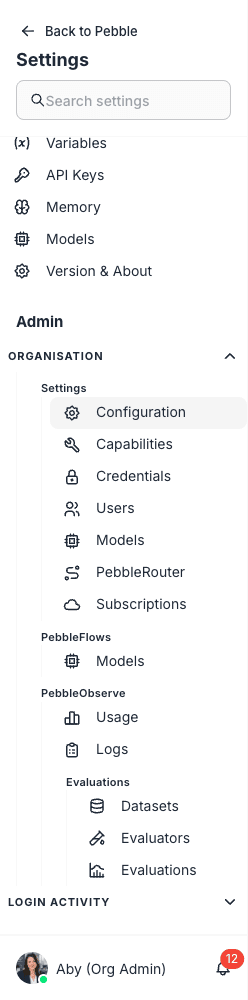
In this section
Settings (the most-visited area)
| Page | What you do there |
|---|---|
| Configuration | Up to 16 settings tabs — Deployment, OAuth, Email, Theme, LiveApp Brand Kit, Ambient Context, Memory, Default Models, Chat Settings, Voice Settings, Agents, LiveApp Refresh, Value, Capabilities, SSO Config, Roles; availability depends on your permissions |
| Capabilities | Manage integrations, tools, skills, flows, and agents available to your org |
| Credentials | Add and manage organisation-shared credentials (provider API keys, OAuth tokens) |
| Users | Invite, edit, deactivate users; assign roles; choose between email-invite and password-set flows |
| Models | Decide which models from the platform catalogue your org can use |
| PebbleRouter | Configure routing profiles, strategies, model membership, API keys |
Flows
| Page | What you do there |
|---|---|
| Flows Models | Edit the JSON model list that powers Flows builders. Database backup/restore, env-driven external sources |
Platform
| Page | What you do there |
|---|---|
| Code Execution Sandbox | The gVisor-isolated Kubernetes sandbox that runs Skill code — architecture, resource limits, security posture, deployment, cost model |
PebbleObserve
| Page | What you do there |
|---|---|
| PebbleObserve → Usage | Org-wide cost, model activity, key activity, MCP server activity, endpoint activity |
| PebbleObserve → Logs | Request logs, audit logs, deleted keys, deleted teams, with filters and search |
| PebbleObserve → Evaluations | Set up evaluations against production traces and curated datasets |
Other
| Page | What you do there |
|---|---|
| Login Activity | Sign-in audit — who logged in, when, with what method, success/failure |
| Asset Sharing | How to share flows, agents, and document stores across workspaces — the per-asset sharing model |
Things that aren’t in Admin
A few things you might expect to find in Admin actually live elsewhere because they’re personal, not organisation-scoped:
- Personal credentials → User Settings → Credentials
- Personal API keys (Flows) → User Settings → API Keys
- Personal model enablement → User Settings → Models
- Personal capabilities → User Settings → Capabilities
And a few things that don’t have a dedicated admin page because they live inside a sub-tab or another product:
- Branding → inside Configuration → Theme
- SSO → inside Configuration → SSO Config
- Roles → inside Configuration → Roles
- Asset sharing → configured per-asset inside Flows (see Asset Sharing)
Where to start
If this is the first time you’re configuring a PebbleAI organisation, walk through the pages in this order:
- Configuration — set deployment URL, OAuth callback, branding, ambient context, default models, SSO
- Credentials — add the provider credentials your models will use
- Models — enable the models you want available in PebbleChat
- PebbleRouter — configure how Auto routing should pick between those models
- Users — invite your team
- Capabilities — provision integrations like Microsoft 365, Jira
Then watch PebbleObserve → Usage and Login Activity for the first week to make sure everything is healthy.